
9 posts tagged with "AI Infrastructure"

AI infrastructure and data center technology

View All Tags

The 4090 Bare Metal Playbook for 2026

· 16 min read
Dhayabaran V
Barrack AI

Renting an RTX 4090 in the cloud costs between $0.16 and $0.69 per hour on container and marketplace platforms, with dedicated bare metal priced separately through providers like Barrack AI. That gap matters. A bare metal 4090 gives you the full 16,384 CUDA cores, 24 GB of GDDR6X, and ~1 TB/s of memory bandwidth with no hypervisor between your code and the silicon, which the community has measured at roughly 5 to 10 percent faster on sustained GPU workloads versus virtualized equivalents. For 7B to 13B model inference, SDXL and Flux image generation, and LoRA fine-tuning, a 4090 matches an A100 80GB on throughput while costing two to five times less per hour. The ceiling is 24 GB of VRAM and the lack of NVLink, which together push training of 70B+ models and high-concurrency production serving onto H100 or B200 hardware. This post lays out the numbers, the provider landscape, and where the 4090 actually earns its keep in an AI pipeline.

What an RTX 4090 actually is under the hood

The RTX 4090 launched October 12, 2022 at a $1,599 MSRP, built on NVIDIA's Ada Lovelace architecture using TSMC's custom 4N process. The AD102 die at its center carries 76.3 billion transistors on 608 mm² of silicon, though the shipping 4090 is a partially cut version of the full die. Core counts are specific and worth memorizing if you do GPU work: 16,384 CUDA cores, 512 fourth-generation Tensor Cores, 128 third-generation RT Cores, 128 streaming multiprocessors, and 72 MB of L2 cache. The card runs at a 2,235 MHz base clock and boosts to 2,520 MHz.

Memory is 24 GB of GDDR6X on a 384-bit bus running at 21 Gbps, delivering 1,008 GB/s of bandwidth. That is roughly half the bandwidth of an A100 80GB and about 30 percent of an H100 80GB SXM, which is the single most important number to understand when comparing the 4090 to data center cards for LLM inference. GeForce cards do not expose ECC on GDDR6X, so silent bit-flips remain a real, if small, concern for multi-day training runs.

Power draw is 450W TGP through a single 16-pin 12VHPWR connector, and NVIDIA recommends an 850W PSU. The card uses PCIe 4.0 x16 and, critically, has no NVLink. Ada Lovelace consumer SKUs dropped NVLink entirely, which means multi-GPU 4090 builds communicate only over the PCIe bus at roughly 32 GB/s bidirectional, compared to 900 GB/s on H100 SXM. That single architectural choice is what kills tensor-parallel scaling on 4090 clusters for 70B models.

Compute throughput on paper is substantial. FP32 runs at 82.6 TFLOPS, BF16 and FP16 Tensor Core performance lands around 165 TFLOPS dense (330 TFLOPS with 2:4 sparsity) when using FP32 accumulate, and FP8 Tensor performance is 330 TFLOPS dense / 660 TFLOPS sparse under the same condition. One important caveat the marketing pages skip: on consumer Ada, FP8 and FP16 matmul throughput with FP32 accumulate is throttled to half the rate of FP16 accumulate, so the 660 peak numbers assume accumulation modes that production training frameworks rarely use. Real-world cuBLASLt FP8 on a 4090 lands closer to 330 TFLOPS.

SpecRTX 4090A100 80GB SXMH100 80GB SXML40S
CUDA cores16,3846,91216,89618,176
VRAM24 GB GDDR6X80 GB HBM2e ECC80 GB HBM3 ECC48 GB GDDR6 ECC
Memory bandwidth1.01 TB/s2.04 TB/s3.35 TB/s864 GB/s
FP32 TFLOPS82.619.56791.6
FP16/BF16 Tensor dense TFLOPS~165312989~362
FP8 Tensor dense TFLOPS~330none1,979733
NVLinkno600 GB/s900 GB/sno
ECCnoyesyesyes
TDP450W400W700W350W

4090 cloud pricing across providers, April 2026

The 4090 cloud market is fragmented, and the spread is wide enough that picking the wrong provider can triple your bill. The table below consolidates on-demand pricing from provider pricing pages and aggregators.

Dedicated bare metal providers

Provider$/hrRegionsBillingEgress
Barrack AIContact for pricingUS, Canada, EU, India, APACMonthly/YearlyFree

Container and VM providers

Provider$/hrBillingNotes
TensorDock$0.37 on-demand, $0.20 spotPer-minuteKVM with GPU passthrough
RunPod Community$0.34Per-secondPreemptible
CoreWeave$0.42HourlyEnterprise orchestration
Fluence$0.53Three-hour minSources from TensorDock, Sesterce
RunPod Secure$0.59-0.69Per-secondEnterprise SLAs
PaperspaceLimited inventoryPer-hourHourly minimum

Marketplace tier (community-supplied hardware)

Provider$/hrNotes
Vast.ai$0.27-0.40Peer-to-peer marketplace. Median ~$0.31
Salad$0.16Distributed consumer hardware

A note on Vast.ai and Salad: Both operate as peer-to-peer networks where individual hosts list their own consumer hardware. You're renting from strangers, not from a company operating its own data centers. Hardware quality, uptime guarantees, security posture, and network performance vary wildly by host. There is no single-tenant isolation. For production inference or anything touching sensitive data, this matters. For batch experimentation on throwaway workloads, it can be fine.

For context on the spread, GetDeploying tracks 114 RTX 4090 listings across 11 cloud providers with a market range of $0.18 to $1.61 per hour. Median on-demand pricing sits near $0.34/hr. Reserved multi-month commitments pull that down another 20 to 40 percent across most providers.

Why bare metal matters specifically for the 4090

Virtualization overhead on GPU workloads is not a rumor. Industry benchmarks peg the hypervisor tax at roughly 5 to 10 percent on sustained GPU throughput, and some testing reports ~20 to 25 percent better sustained-load performance on bare metal versus VPS-style sharing for Llama inference. For a consumer GPU already working hard against its 24 GB ceiling, that overhead is the difference between fitting a model with a useful KV cache and having to run a smaller quant.

Bare metal also removes the multi-tenant risks that matter more on consumer silicon than on MIG-partitioned data center cards. The 4090 cannot be sliced with MIG or vGPU. One physical card is always one tenant. On a container platform, multiple customers share the underlying host CPU, RAM, PCIe, and NVMe even if the GPU is dedicated, which produces noisy-neighbor effects on data loading, checkpointing, and any CPU-bound preprocessing. Recent GPU-side Rowhammer research on GDDR6 (GDDRHammer, GPUBreach) adds a security layer to this argument: dedicated hardware is the cleanest mitigation for cross-tenant attacks on consumer GPUs that lack the security features of data center silicon.

Kernel-level control is the other bare metal benefit that often gets left off pricing pages. You pick the driver version, the CUDA toolkit, the kernel, and you can load NVIDIA's open GPU kernel modules or exotic distro configurations. On VM or container platforms the host admin controls the driver branch and you inherit whatever nvidia-smi behavior and persistence mode they set.

The restrictions are real and worth naming. The 4090 does not support ECC, so long training runs carry some bit-flip risk that data center cards with HBM ECC do not. There is no NVLink, so tensor-parallel scaling for models larger than 24 GB is capped by PCIe 4.0 bandwidth. The 12VHPWR connector has a documented melting history at sustained load. And consumer cooler designs were never built for 24/7 rack duty cycles. A provider doing bare metal 4090 correctly is re-housing cards in server chassis with proper airflow, not bolting retail coolers into 1U boxes.

Where the 4090 beats A100, H100, and L40S on price-performance

For Llama 3 8B inference at batch size 1 on llama.cpp, an RTX 4090 produces 127.7 tokens/sec at Q4_K_M and 54.3 tokens/sec at FP16. An A100 PCIe 80GB manages 138.3 and 54.6 tokens/sec on the same workload. An H100 PCIe delivers 144.5 and 67.8 tokens/sec. For single-stream inference on a model that fits in VRAM, the 4090 lands within 8 percent of A100 at Q4 and matches it at FP16. The H100 pulls ahead only when memory bandwidth becomes the limit, which happens at FP16 with long contexts.

For prompt processing (the prefill phase, which is compute-bound rather than memory-bound), the 4090 hits 9,056 tokens/sec on FP16 Llama 3 8B, compared to 10,343 on H100 PCIe. That is a 14 percent gap, much tighter than the price gap between the two cards.

Quantized inference is where the 4090 genuinely shines. Llama 2 7B with AWQ INT4 hits 194 tokens/sec on a 4090 at batch 1, a 3.7x speedup over FP16. Llama 2 13B at AWQ INT4 hits 110 tokens/sec on the same card.

Stable Diffusion and Flux are a near-tie with A100 out of the box. Head-to-head testing across 12 benchmark variants covering SD, SDXL, and Flux found the two cards perform nearly identically, with each card winning roughly half the tests. On community clouds, a 4090 generates SDXL 1024x1024 images at ~15.6 seconds average including overhead, which works out to about 769 SDXL images per dollar at $0.27/hr. Flux.1 Schnell with FP8 optimizations on a 4090 runs in the 1 to 3 second range per image, yielding up to 5,243 Flux images per dollar.

Fine-tuning economics favor the 4090 for anything that fits. A typical QLoRA fine-tune of Llama 3 8B on a domain dataset runs 3 to 4 hours on a 4090. At $0.44/hr that is $1.30 to $1.75 per full fine-tune run. The same job on an A100 80GB runs 1.5 to 2x faster but at 3 to 4x the hourly rate, so net cost favors the 4090.

What fits in 24 GB, and what does not

The rule of thumb for LLM inference is 2 GB per billion parameters at FP16, 1 GB/B at FP8 or INT8, and roughly 0.5 GB/B at 4-bit. Add KV cache scaling with batch size and context length.

ModelFP16 on 4090Notes
Phi-3 mini 3.8BFits easily~7.6 GB weights
Mistral 7B, Qwen 2.5 7BFits~14 GB, room for KV cache
Llama 3 / 3.1 8BFits~16 GB, tight at 128K context
Gemma 2 9BFits, tight~18 GB
Flux.1 Dev (12B)Borderline~22 GB peak, T5 encoder often offloaded to CPU
Llama 3 13BDoes not fit at FP16~26 GB, needs FP8 or 4-bit
Llama 3 70BDoes not fit140 GB at FP16
Mixtral 8x7BDoes not fit at FP16~93 GB, even Q4 (~26 GB) slightly overflows
SDXL, SD 1.5Fits easily~10 GB peak

Quantization extends the envelope but not as far as the marketing implies. GPTQ and AWQ at 4-bit roughly halve memory versus FP8, putting 30B dense models in the 16 to 20 GB range with room for KV cache. GGUF Q4_K_M for Llama 3 70B is 42.5 GB, which does not fit on a 24 GB card even with all tricks enabled. Claims that "Llama 3 70B runs on a 4090" always rely on partial CPU offload through llama.cpp, which produces single-digit tokens/sec throughput. For 70B+ workloads, move to H100, H200, or B200 hardware.

QLoRA fine-tuning works comfortably up to 13B on a 4090 and can reach 30B with gradient checkpointing and small sequence lengths. Full-precision LoRA caps out around 7B with checkpointing. Flux.1 LoRA training in BF16 fits in 24 GB using Kohya.

4090 versus 5090: the 2026 question

The RTX 5090 launched January 30, 2025 at a $1,999 MSRP and promptly disappeared into a months-long supply crunch. On paper it is a real upgrade: 21,760 CUDA cores, 32 GB of GDDR7, 1,792 GB/s of memory bandwidth, fifth-generation Tensor Cores with native FP4 support, and a 575W TDP. Memory bandwidth is the headline number, up 78 percent over the 4090.

Real-world uplift over the 4090 sits at about 27 percent on gaming and FP16 AI workloads, with larger gains on memory-bandwidth-bound tasks. Flux FP8 image generation is roughly 75 percent faster, and with native FP4 the 5090 reaches over 4x the 4090's FP8 performance on some benchmarks.

So is the 4090 still worth renting with 5090s available? For most workloads, yes. Cloud 5090s run roughly 1.5 to 2x the rental rate of 4090s, which closes the gap on throughput-per-dollar. Both cards cap below the 80 GB threshold where data center hardware takes over, so a workload that does not fit on a 4090 usually does not fit on a 5090 either. Two years of Ada optimization also means the quantization kernels, vLLM paths, and Flash-Attention implementations on the 4090 are production-hardened, whereas Blackwell consumer software support has only recently matured. The 5090 wins cleanly when your workload sits in the 24 to 32 GB band, is memory-bandwidth limited, or can exploit native FP4.

The China ban and why cloud rental became the primary access path

On November 17, 2023 the RTX 4090 became subject to a US export ban to China after the Bureau of Industry and Security revised its controls using a Total Processing Performance metric. The 4090 scored a TPP of 5,285 against a 4,800 threshold. NVIDIA launched the RTX 4090D with 14,592 CUDA cores as a compliant alternative.

The ban created a grey market with Chinese retail pricing spiking to roughly $3,600 to $4,150. Chinese factories began stripping retail 4090s and resoldering the AD102 die onto blower-cooled reference PCBs suited to AI servers. Compounding the supply picture, NVIDIA reportedly ceased 4090 production in late 2024 to clear capacity for Blackwell. New retail stock has been thinning since. Used pricing in the US runs $1,100 to $1,400, new retail sits at $1,500 to $2,800 depending on AIB partner.

For teams that need 4090s at scale, purchasing dozens of cards from a shrinking supply is not realistic, and cloud rental became the primary access path.

Conclusion

The RTX 4090 in 2026 is the best price-performance GPU in the cloud for a specific and large category of work: inference and fine-tuning of models that fit in 24 GB, image generation at almost any scale, and research cycles where cost per experiment is the binding constraint. Production ended in late 2024, retail pricing inflated, and the China export ban removed a chunk of global supply, which is why cloud rental became the dominant access path rather than a convenience.

Pricing ranges from $0.16/hr on decentralized consumer networks to dedicated bare metal through providers like Barrack AI that offer single-tenant 4090 hardware across US, Canada, EU, India, and APAC with monthly/yearly billing and zero egress fees. Bare metal matters more on a consumer GPU than on a data center card because the margins for hypervisor overhead, noisy neighbors, and security isolation are thinner. For dedicated 4090 bare metal pricing, contact Barrack AI.


FAQ

How much does it cost to rent an RTX 4090 in the cloud?

On-demand 4090 pricing ranges from $0.16/hr on decentralized consumer networks like Salad to $0.69/hr on RunPod Secure. Marketplace rates on Vast.ai average around $0.31/hr but come from individual community hosts with variable reliability. Dedicated bare metal providers charge more for single-tenant hardware with guaranteed isolation. The cross-provider median tracked by GetDeploying is approximately $0.34/hr.

What is the difference between bare metal and container 4090 rental?

Bare metal gives you the full physical GPU card with no hypervisor or container runtime between your code and the silicon. You get kernel-level control, full CUDA access, and no noisy-neighbor effects. Container platforms like RunPod and Vast.ai typically dedicate the GPU but share the host CPU, RAM, and NVMe across tenants, which introduces 5 to 10 percent overhead on sustained GPU workloads and potential noisy-neighbor effects on data loading.

What AI models fit on a 4090's 24 GB VRAM?

At FP16: Llama 3 8B (~16 GB), Mistral 7B (~14 GB), Qwen 2.5 7B, Gemma 2 9B (~18 GB), SDXL (~10 GB), and Flux.1 Dev at the limit (~22 GB). At 4-bit quantization: models up to roughly 30B parameters. Llama 3 70B does not fit even at 4-bit (42.5 GB at Q4_K_M). Claims of running 70B on a 4090 always involve CPU offloading at single-digit tokens/sec.

Is the 4090 faster than the A100 for LLM inference?

For models that fit in 24 GB, it is within 8 percent of A100 at Q4 quantization and matches it at FP16 on single-stream inference. The A100 wins on workloads above 24 GB (where the 4090 cannot run them at all), on multi-GPU scaling (NVLink vs PCIe), and on concurrent batch serving where its 80 GB and 2 TB/s bandwidth provide headroom the 4090 lacks.

Should I rent a 4090 or an H100?

If your model fits in 24 GB and you are optimizing for cost per token or cost per image, the 4090 is 2 to 5x cheaper per hour and delivers comparable single-stream throughput. If your model exceeds 24 GB, needs tensor parallelism across GPUs, requires ECC memory for multi-day training, or serves concurrent requests at batch sizes above 32, the H100 is the correct card.

Is the 4090 still worth renting with the 5090 available?

For most workloads, yes. Cloud 5090s cost roughly 1.5 to 2x more per hour, and the 27 percent average performance uplift does not overcome the price gap on throughput-per-dollar for FP16 workloads. The 5090 wins when your workload sits in the 24 to 32 GB band, is memory-bandwidth limited, or can exploit native FP4 precision.

Why can't I just buy 4090s for my own cluster?

NVIDIA reportedly ceased 4090 production in late 2024. New retail stock is thinning and prices run $1,500 to $2,800+. The China export ban removed supply from the global market. Additionally, NVIDIA's GeForce EULA restricts data center deployment of consumer GPU drivers, though enforcement has been limited. Cloud rental solves the procurement, compliance, power, and cooling problems simultaneously.

Does Barrack AI offer bare metal 4090 instances?

Barrack AI provides dedicated bare metal 4090 instances with single-tenant isolation, monthly/yearly billing, and zero egress fees across US, Canada, EU, India, and APAC regions. For pricing, contact Barrack AI.

What workloads should NOT use a 4090?

Any model exceeding 24 GB at your target precision (Llama 70B, Mixtral 8x22B, DeepSeek-V3). Multi-GPU tensor-parallel training. Production inference endpoints requiring ECC reliability guarantees. High-concurrency serving where KV cache exceeds 24 GB. For these workloads, move to H100 ($2.00+/hr), H200, or B200 hardware.

How does QLoRA fine-tuning work on a 4090?

QLoRA fine-tuning works comfortably up to 13B parameters on a 4090. A typical Llama 3 8B QLoRA run takes 3 to 4 hours. At community cloud rates (~$0.44/hr) that is $1.30 to $1.75 per run. Full-precision LoRA caps out around 7B with gradient checkpointing. Flux.1 LoRA training in BF16 fits in 24 GB using Kohya.
H200 Price in 2026: What You Actually Pay Per Hour

· 15 min read
Dhayabaran V
Barrack AI

The NVIDIA H200 rents for anywhere from $2.00 to $13.78 per GPU-hour in April 2026, a roughly 6.5x spread driven almost entirely by whether you rent from a hyperscaler VM or a specialist bare-metal provider. That gap matters because the H200 is the same Hopper silicon as the H100 with a bigger, faster memory stack, so every dollar saved on the hardware flows straight to your tokens-per-dollar math. Since CoreWeave first brought H200 to general availability in August 2024, supply has broadened to 20+ providers, yet median on-demand pricing has actually climbed roughly 28% year-over-year as Llama 3 70B and Mixtral 8x22B inference workloads keep demand stubbornly high. The practical question is no longer "can I get an H200?" but "which tier of the market should I buy from, and is it still the right chip with Blackwell shipping?" This post answers both with current numbers.

What the H200 actually is, and why its memory is the whole point

The H200 is a memory refresh of the H100, not a new architecture. Both GPUs use the identical GH100 die with 16,896 CUDA cores and 528 fourth-generation Tensor Cores, and both deliver the same 1,979 TFLOPS of FP8 dense compute (3,958 TFLOPS with sparsity). What changed is the HBM stack: H200 SXM ships with 141 GB of HBM3e at 4.8 TB/s, versus the H100 SXM's 80 GB HBM3 at 3.35 TB/s. That's 76% more capacity and 43% more bandwidth inside the same 700W power envelope and SXM5 mechanical form factor.

The PCIe variant, H200 NVL, keeps the 141 GB HBM3e and 4.8 TB/s bandwidth but lowers max TDP to 600W, drops Tensor Core throughput roughly 15% (1,671 TFLOPS FP16 sparse, 3,341 TFLOPS FP8 sparse), and ships as a double-wide passive card designed for air-cooled enterprise servers. NVIDIA bundles a 5-year NVIDIA AI Enterprise subscription with every NVL card. Both variants use PCIe Gen5 x16 and fourth-generation NVLink at 900 GB/s bidirectional, and both support MIG partitioning (up to seven instances at ~18 GB each on SXM).

SpecH100 SXMH200 SXMH200 NVL (PCIe)B200 (for context)
Memory80 GB HBM3141 GB HBM3e141 GB HBM3e192 GB HBM3e
Bandwidth3.35 TB/s4.8 TB/s4.8 TB/s8.0 TB/s
TDP700 W700 W600 W~1,000 W
FP8 Tensor (sparse)3,958 TFLOPS3,958 TFLOPS3,341 TFLOPS10,000 TFLOPS
FP16/BF16 (sparse)1,979 TFLOPS1,979 TFLOPS1,671 TFLOPS5,000 TFLOPS
NVLink900 GB/s900 GB/s900 GB/s (via bridge)1,800 GB/s
PCIeGen5 x16Gen5 x16Gen5 x16Gen5 x16

The practical consequence is stark. For compute-bound prefill on models that already fit in 80 GB, H200 offers essentially zero uplift over H100. For memory-bound decode and any workload where the weights or KV cache exceed 80 GB, H200 is a different class of chip entirely.

H200 cloud pricing across 20+ providers, April 2026

Pricing sorts cleanly into three tiers. The data below reflects on-demand rates, not reserved or committed pricing, as of mid-April 2026. Where providers sell 8-GPU nodes exclusively, we've normalized to per-GPU-hour.

Provider$/GPU-hrForm factorBillingEgress
Barrack AI (US, Canada, EU, India, APAC)from $2.00Bare metal, single-tenantMonthly/YearlyFree
FluidStack$2.30 (commit)Bare metalHourlyFree
GMI Cloud$2.50-3.35Bare metalHourly--
Genesis Cloud$2.80Bare metal (8-GPU min)HourlyFree
Paperspace / DO Gradient$3.44VM + bare metalHourlyFree
Civo$3.49K8s VMHourlyFree
Nebius$3.50KubeVirt VM (near-BM)Per-minute$0.015/GiB std
Jarvislabs$3.80VM (1-GPU)Per-minute--
RunPod (Secure)$3.99ContainerPer-secondVaries
Crusoe$4.29Light VMPer-minuteFree
Spheron$4.54Bare metalPer-minute--
Together AI$4.99Dedicated VMPer-minute--
AWS p5e.48xlarge$4.98 (Capacity Blocks)Nitro VM1-day minStandard AWS
Fireworks AI~$6.00Dedicated VMPer-second--
CoreWeave$6.31Bare-metal K8sHourly/minute--
Oracle BM.GPU.H200.8$10.00Bare metalPer-second10 TB/mo free
Azure ND H200 v5$10.60-13.78Hyper-V VMPer-secondStandard Azure
GCP a3-ultragpu-8g~$10.87VMPer-secondStandard GCP

A note on Vast.ai: Vast.ai lists H200 rates around ~$2.29-2.32/hr, but it operates as a peer-to-peer marketplace where individual hosts list their own hardware. You're renting from strangers, not from a company operating its own data centers. Hardware quality, uptime guarantees, security posture, and network performance vary wildly by host. There is no single-tenant isolation. For production inference or anything touching sensitive data, this matters. For batch experimentation on throwaway workloads, it can be fine.

The cross-provider median tracked by GetDeploying is $3.89/GPU-hr on-demand, with reserved averaging $3.09 and spot $2.91. AWS notably does not offer true on-demand H200 at all. P5e instances sell only via EC2 Capacity Blocks with a one-day minimum, and AWS raised those rates roughly 15% in January 2026. Azure's ND H200 v5 is the most expensive meaningful option on the market. Among specialist clouds, Nebius at $3.50 is the cheapest self-serve listed price with no waitlist, while Barrack AI's from $2.00/hr is the lowest rate on a dedicated bare-metal single-tenant H200 with free egress, available across US, Canada, EU, India, and APAC.

Benchmarks that actually justify the H200 premium

NVIDIA's headline number is 1.9x faster Llama 2 70B inference versus H100, measured with TensorRT-LLM using FP8 precision, 2,048-token input and 128-token output. Critically, that config runs batch size 32 on H200 versus batch size 8 on H100. The uplift comes largely from the H200's ability to hold more of the KV cache in memory, not from raw compute. On GPT-3 175B with 8-way tensor parallelism, NVIDIA measures 1.6x higher throughput. First-token latency barely moves, because prefill is compute-bound on identical silicon.

MLPerf Inference v4.1 (August 2024) put specific numbers on those claims: an 8x H200 system delivered 32,790 tokens/sec server mode on Llama 2 70B, versus roughly 24,525 tok/s for 8x H100, a 1.34x per-round uplift once both generations received equivalent software optimization. CoreWeave's submission hit 33,000 tok/s. In MLPerf Training v4.0, H200 finished Llama 2 70B LoRA fine-tuning in 24.7 minutes on a single 8-GPU node, a 14% improvement over H100, and ran 47% faster than H100 on the GNN benchmark.

Third-party production benchmarks tell a more nuanced story. RunPod measures a 0-11% uplift for models under 80 GB, 47% for BF16 large-batch inference that overflows H100 memory, and up to 3.4x when the H100 literally cannot fit the workload. A Medium/Data Science Collective test at 8K input + 8K output context measured 1.83x to 2.14x H200 advantage across three large models. The honest summary: the H200's real-world uplift is roughly 1.3-1.5x for workloads H100 can run comfortably, and 1.8-3.4x for workloads where memory becomes the wall.

Where 141 GB actually matters

The H200's value proposition collapses to one sentence: it lets a single GPU do what an H100 needs two GPUs to do, and that eliminates tensor-parallel communication overhead. The models that benefit most are the ones whose weights plus realistic KV caches sit in the 80-141 GB window:

  • Llama 3/3.1/3.3 70B at FP16 weighs roughly 140 GB and barely fits on a single H200. On H100 you need two GPUs with tensor parallelism, losing ~10-20% to NVLink synchronization.
  • Mixtral 8x22B (141B total parameters, 39B active) fits on one H200 at FP8 with headroom for KV cache; on H100 it requires two-GPU TP even in FP8.
  • Llama 3 70B at FP8 serving long context: a single 128K request's KV cache is ~40 GB, and four concurrent 128K requests blow through 160 GB. H200 keeps these workloads single-GPU; H100 forces you to either shard or cap concurrency.
  • DeepSeek-V3 and R1 (671B parameters) fit on a single 8x H200 HGX node at FP8 (~1,128 GB aggregate HBM) with room for KV cache. An 8x H100 node at 640 GB is too tight.
  • Llama 3.1 405B fits in BF16 on 8x H200 NVL without spanning nodes, a clean single-node deployment that 8x H100 cannot achieve without FP8 quantization.

Conversely, if you're running Llama 3 8B, Mistral 7B, Gemma 9B, or any 70B model that's already INT4-quantized at short context, H100 is usually 20-30% cheaper and performs within 10%. For compute-bound prefill, pay for H100.

Bare metal versus virtualized: the H200 case is unusually strong

Hypervisor overhead typically costs 5-15% of GPU performance, with vendor-sponsored benchmarks claiming up to 30% for large transformer training and Character.AI publicly attributing a 13.5x cost advantage in inference economics to bare metal. That overhead matters more for H200 than for almost any other accelerator, because the chip's entire premium over H100 is memory bandwidth and NVLink fabric access, precisely what virtualization layers tax the most.

The market has bifurcated accordingly. Oracle is the only major hyperscaler offering bare-metal H200 (BM.GPU.H200.8 at $10/GPU-hr); AWS p5e, Azure ND H200 v5, and GCP a3-ultragpu-8g all sit behind Nitro, Hyper-V, or Google's VM stack respectively. Specialist neoclouds have taken the opposite path: CoreWeave, Lambda, Crusoe, Nebius, GMI Cloud, and Barrack AI all deliver dedicated or near-dedicated hardware, and most are cheaper than any hyperscaler VM. The "bare metal is premium-priced" assumption that held in 2022 is dead for H200. Today bare metal is both cheaper and faster across most of the specialist tier.

Egress compounds the gap. A production inference endpoint shipping 50 TB/month of tokens to end users runs roughly $4,200-5,000/month in egress alone on AWS, Azure, or GCP. Providers with zero egress fees (Crusoe, Lambda, Barrack AI, Genesis Cloud, DigitalOcean, FluidStack) remove that line item entirely. For high-throughput serving, egress can eclipse compute spend; Gartner estimates egress consumes 10-15% of typical cloud bills and occasionally 40%.

Is H200 still the right buy with Blackwell shipping?

B200 reached volume availability through most major clouds by mid-2025, and B300 (Blackwell Ultra) began shipping in January 2026 with 288 GB HBM3e, 8 TB/s bandwidth, and roughly 1.5x the FP4 compute of B200. On-demand B200 now rents for $4.99-6.25/GPU-hr at RunPod, Lambda, and Modal, with spot rates as low as $2.05. B300 appears at $4.95-18/hr depending on provider, with Spheron spot at $2.90.

That creates three decision zones. First, if your workload uses FP4 inference (native Blackwell Transformer Engine), B200 delivers 2-3x H200 throughput and wins on $/token despite the higher hourly rate. Second, if you're running FP8 or BF16 at scale (which covers most production LLM inference today), H200 at $2-4/hr on specialist clouds remains the best price-performance point, because Blackwell's advantage narrows to roughly 1.2-1.5x in those precisions. Third, if you're fine-tuning or training on Hopper-optimized stacks (most of the open-source ecosystem), H200 remains the lowest-friction choice.

Counterintuitively, H200 pricing has risen slightly through 2025-2026 rather than dropping, because Llama 3 70B and Mixtral inference demand has outpaced the Blackwell rollout and NVIDIA received conditional January 2026 export clearance for H200 sales to China. The historical pattern of 15% list-price cuts within six months of a successor's launch has not materialized here. Expect H200 to remain a workhorse tier through at least 2027.

Conclusion: the H200 price you pay is a choice, not a market rate

The 6.5x spread from $2.00 to $13.78 per hour is not a pricing failure. It's the market segmenting by what you actually need. Hyperscaler VMs at $10+ buy you enterprise procurement, compliance checkboxes, and integration with the rest of AWS/Azure/GCP. Mid-tier specialists at $4-6 buy you mature tooling and managed Kubernetes. The sub-$3 bare-metal tier, where Barrack AI's from $2.00/hr bare-metal offering with monthly/yearly billing, zero egress, and availability across US, Canada, EU, India, and APAC sits alongside Genesis Cloud and FluidStack, buys you the raw silicon with hypervisor overhead removed and the egress tax deleted.

The H200 itself has become the defining chip for the memory-bound era of LLM inference: the one that turns 70B-class models into single-GPU problems and makes Mixtral 8x22B a single-card deployment. Blackwell will eventually displace it for FP4-native workloads, but for most of 2026 the question isn't whether H200 is worth renting. It's whether you're overpaying for it. Given that a bare-metal H200 from $2.00/hr delivers the same silicon as a $10.60/hr Azure VM, with 5-15% better performance and no egress meter running, the answer for most workloads points decisively toward the specialist tier.


FAQ

How much does an NVIDIA H200 GPU cost per hour in 2026?

On-demand H200 pricing ranges from approximately $2.00/hr on specialist bare-metal providers like Barrack AI to $13.78/hr on Azure ND H200 v5 VMs. The cross-provider median is $3.89/hr. Hyperscalers (AWS, Azure, GCP) charge $5-14/hr. Specialist bare-metal clouds charge $2-4/hr. The price depends on whether you're renting virtualized or bare-metal, and whether the provider charges egress fees.

What is the difference between H200 SXM and H200 NVL?

Both have 141 GB HBM3e at 4.8 TB/s bandwidth. The SXM variant is a 700W mezzanine card designed for liquid-cooled HGX baseboard systems with full NVLink mesh. The NVL variant is a 600W double-wide PCIe card for air-cooled servers, with roughly 15% lower Tensor Core throughput (3,341 vs 3,958 TFLOPS FP8 sparse). NVL includes a 5-year NVIDIA AI Enterprise subscription. Most cloud providers offer the SXM variant.

How much faster is the H200 compared to the H100?

For memory-bound workloads (LLM inference decode, large KV caches), H200 delivers 1.3-1.9x higher throughput than H100. For workloads that exceed 80 GB VRAM and require tensor parallelism on H100 but fit on a single H200, the advantage reaches 1.8-3.4x. For compute-bound workloads on models under 80 GB, the uplift is 0-11%. The H200 uses the same compute silicon as H100; all gains come from the larger, faster HBM3e memory.

Is the H200 worth renting over the H100?

Yes, if your model's weights plus KV cache exceed 80 GB at your target precision. Llama 3 70B at FP16 (~140 GB), Mixtral 8x22B at FP8, and any 70B model serving long-context (128K+) requests benefit substantially. No, if you're running sub-80 GB workloads like Llama 3 8B, Mistral 7B, or INT4-quantized 70B at short context. In that case, H100 at $1.49-2.69/hr delivers near-identical performance for less money.

Should I rent H200 or wait for B200/B300?

B200 is already available at $4.99-6.25/hr on-demand. B300 started shipping in January 2026. If your workload uses FP4 inference natively, B200 wins on $/token. If you're running FP8 or BF16, which covers most production inference today, H200 at $2-4/hr on specialist clouds still delivers the best price-performance. The open-source ecosystem (vLLM, TensorRT-LLM, SGLang) is fully optimized for Hopper; Blackwell-specific optimizations are still maturing.

What is the H200 hardware purchase price?

Individual H200 SXM GPUs are not sold separately. The standard procurement unit is the HGX H200 8-GPU server, with system prices reported between $250,000 and $500,000 depending on vendor and configuration. The H200 NVL PCIe card lists around $32,000-40,000 per card through enterprise OEMs like PNY, Exxact, and Supermicro.

What models fit on a single H200 that don't fit on a single H100?

Llama 3/3.1/3.3 70B at FP16 (~140 GB), Mixtral 8x22B at FP8 with KV cache headroom, and Llama 3 70B at FP8 with 4+ concurrent 128K-context requests. On H100 (80 GB), all of these require two-GPU tensor parallelism, which adds 10-20% communication overhead and doubles your GPU cost.

What is the cheapest way to rent an H200 GPU?

As of April 2026, the lowest-priced dedicated bare-metal H200 is Barrack AI at approximately $2.00/GPU-hr, billed monthly or yearly, with zero egress fees, with availability across US, Canada, EU, India, and APAC regions. Vast.ai lists lower headline rates (~$2.29/hr) but operates as a peer-to-peer marketplace where you rent from individual community hosts with no single-tenant isolation or consistent uptime guarantees. FluidStack offers $2.30/hr with commitment. Spot pricing on various providers can go below $2.00 but with preemption risk.

Does bare metal actually perform better than virtualized H200?

Yes. Hypervisor overhead typically costs 5-15% of GPU performance, with some benchmarks showing up to 30% loss for large transformer workloads. This matters disproportionately for H200 because the chip's advantage over H100 is entirely memory bandwidth and NVLink access, which are the resources virtualization layers tax most heavily. Oracle is the only hyperscaler offering bare-metal H200; most specialist clouds (CoreWeave, Lambda, Crusoe, Barrack AI) default to dedicated or near-dedicated hardware.

Why hasn't H200 pricing dropped with Blackwell available?

Two factors. First, Llama 3 70B and Mixtral inference demand has grown faster than Blackwell supply has ramped, keeping H200 utilization high. Second, NVIDIA received conditional January 2026 export clearance for H200 shipments to China, creating additional demand. The historical pattern of 15% list-price declines within six months of a successor GPU's launch has not materialized for H200.

Google Cloud Fractional G4 Uses vGPU, Not MIG. Here Is Why That Matters.

· 15 min read
Dhayabaran V
Barrack AI

Google Cloud announced fractional G4 VMs at GTC 2026 in March. The pitch is straightforward. The RTX PRO 6000 Blackwell Server Edition is a 96 GB GDDR7 GPU. Most workloads do not need all 96 GB. So Google slices one physical GPU into fractions (1/8, 1/4, 1/2) and sells you only what you need. Pay less, get less. Simple.

What Google does not say in the announcement, but does say in the documentation, is how that slicing works. The fractional G4 shapes use NVIDIA vGPU. Not MIG. That is a specific technical choice with specific security consequences, and the distinction matters if you are putting anything sensitive on a fractional instance.

This post covers what fractional G4 is actually built on, what NVIDIA's own documentation says about vGPU isolation versus MIG isolation, the Virtual GPU Manager's CVE history over the past two years, and what all of this means for workloads that care about tenant separation.

Fractional GPU Security: NVIDIA Says Sharing GPUs Is Not Safe

· 20 min read
Dhayabaran V
Barrack AI

The fractional GPU pitch goes like this. Full GPUs are expensive. Most workloads do not need a full GPU. So we will slice one GPU into fractions, rent you a fraction, and pass the savings along. Pay for what you use, the marketing says. Efficient, cheap, modern.

The part of the pitch that never gets said out loud is that the fraction you rented sits on the same physical hardware as someone else's fraction, and the isolation between your work and theirs is much weaker than the marketing suggests. NVIDIA's own documentation says so directly. Published research from MICRO, CCS, ISCA, and USENIX Security has been demonstrating it for years. The gap between what NVIDIA recommends and what fractional GPU providers actually ship is the entire problem.

This post is about fractional GPU security and why fractional GPU is the wrong place for anything you care about. Not just regulated enterprise workloads. Anything that matters to the person running it. Your company's inference traffic. Your startup's model weights. Your research data. Your unpublished thesis. If the work has value to you, fractional GPU is the wrong answer.

GDDRHammer and GeForge: GPU Rowhammer Now Achieves Full System Compromise

· 15 min read
Dhayabaran V
Barrack AI

Last updated: April 2026. GPU security is an evolving field. Verify current mitigation guidance with your infrastructure provider.

Rowhammer just jumped from CPUs to GPUs. And this time it is not about corrupting model weights or degrading inference accuracy. Two independent research teams disclosed attacks on April 2, 2026 that escalate GDDR6 memory bit flips into a root shell on the host machine. From an unprivileged CUDA kernel. No authentication required.

The original GPUHammer research demonstrated 8 bit flips on an RTX A6000 and showed that a single strategic flip could drop ImageNet accuracy from 80% to 0.1%. That was a data integrity problem. What GDDRHammer and GeForge demonstrate is a full privilege escalation chain: GPU memory corruption to GPU page table hijacking to CPU memory read/write to root shell.

Both papers will be presented at the 47th IEEE Symposium on Security and Privacy (IEEE S&P 2026), running May 18 through 20 in San Francisco. A third concurrent attack called GPUBreach, from the University of Toronto team behind the original GPUHammer, goes even further by bypassing IOMMU protections entirely. All three are disclosed at gddr.fail and gpubreach.ca.

The RTX A6000 is one of the two confirmed vulnerable GPUs, and it is widely deployed across GPU cloud platforms. This post covers what the attacks actually do, which hardware is affected, what the mitigations cost, and what it means for anyone running GDDR6 GPUs in a shared environment.

How GDDRHammer works

GDDRHammer was developed by researchers at UNC Chapel Hill, Georgia Tech, and Mohamed bin Zayed University of Artificial Intelligence. The paper, code (github.com/heelsec/GDDRHammer), and supplementary materials are all available at gddr.fail.

The attack exploits a flaw in how NVIDIA's default memory allocator (cudaMalloc) places GPU page tables. Under normal operation, page table entries should be isolated from user-controlled data. They are not. The allocator co-locates page tables and user data in the same GDDR6 memory region. That means an attacker who can induce bit flips in adjacent rows can corrupt page table entries.

The team characterized Rowhammer behavior across 25 GDDR6 GPUs. They developed double-sided hammering patterns that exploit GPU parallelism, specifically the SIMT architecture and multi-warp execution model, to generate far more intense memory access patterns than a CPU can produce. The result was roughly 64x more bit flips than the original GPUHammer work.

The actual attack chain has four parts. The attacker uses a memory massaging technique to steer GPU page table entries toward DRAM rows with known-vulnerable bits. Then they hammer adjacent rows to flip bits in those page table entries. A single flip in the right position redirects a GPU virtual address mapping to point at CPU physical memory via the PCIe BAR1 aperture. From there, the GPU performs DMA reads and writes to arbitrary CPU memory. The attacker modifies kernel data structures and gets a root shell.

On the RTX A6000, the team achieved an average of 129 bit flips per memory bank. Compare that to GPUHammer's 8 bit flips across 4 banks.

How GeForge differs

GeForge was built by a separate team at Purdue, University of Rochester, University of Western Australia, HydroX AI, and Clemson. Code is at github.com/stefan1wan/GeForge, and a video demo of the root shell exploit is at gddr.fail/files/geforge-demo.mp4.

The main architectural difference is where in the GPU's address translation hierarchy the attack lands. GDDRHammer corrupts the last-level page table (PT). GeForge goes one level deeper and targets the last-level page directory (PD0). The page directory contains pointers to page tables, so corrupting a PD0 entry lets the attacker forge entirely new page table mappings instead of just modifying existing ones. Broader control.

GeForge introduced three techniques that set it apart. A memory massaging strategy tuned specifically for page directory placement. A non-uniform Rowhammer pattern that varies hammering intensity across rows rather than applying uniform pressure, which produced more bit flips. And a page-anchoring technique that uses timing side-channels to locate GPU physical addresses at runtime, since the GPU physical address layout is not exposed to userspace.

Results: 1,171 bit flips on an RTX 3060. 202 bit flips on an RTX A6000. Both exploits achieve the same end state as GDDRHammer. When IOMMU is disabled (the default on most systems), the attacker gets arbitrary read/write to CPU memory and a root shell from an unprivileged user account.

GPUBreach bypasses IOMMU

This is the one that should concern cloud operators most. GPUBreach, from the University of Toronto Computer Security Lab (the same group behind GPUHammer), will also be presented at IEEE S&P 2026. It is disclosed at gpubreach.ca.

GDDRHammer and GeForge can be blocked by enabling IOMMU, which restricts GPU DMA access to only host memory regions mapped by the OS. GPUBreach sidesteps that entirely. It starts the same way, with Rowhammer bit flips corrupting GPU page tables from an unprivileged CUDA kernel. But instead of trying to DMA into CPU memory (which IOMMU blocks), GPUBreach chains the GPU-side memory corruption with newly discovered memory-safety bugs in the NVIDIA GPU driver. The driver runs as a CPU-side kernel component. Exploiting it bypasses IOMMU because the escalation path goes through software, not hardware DMA.

That means IOMMU alone is not enough. Full technical details of the driver vulnerabilities exploited by GPUBreach are pending the IEEE S&P presentation in May.

Which GPUs are affected

The researchers tested specific models across multiple memory technologies. The picture is clear for now.

GPUMemoryArchitectureBit FlipsStatus
RTX 3060GDDR6Ampere1,171Exploit demonstrated
RTX A6000GDDR6Ampere202Exploit demonstrated
RTX 3080GDDR6XAmpere0Not vulnerable
RTX 4060 / 4060 TiGDDR6Ada Lovelace0Not vulnerable
RTX 6000 AdaGDDR6Ada Lovelace0Not vulnerable
RTX 5050GDDR7Blackwell0Not vulnerable
A100HBM2eAmpere0On-die ECC
H100HBM3HopperNot testedOn-die ECC
H200HBM3eHopperNot testedOn-die ECC

Source: gddr.fail, GDDRHammer and GeForge papers (IEEE S&P 2026). "Not vulnerable" = no bit flips observed in testing. "On-die ECC" = always-on hardware error correction, assessed as resistant to current single-bit techniques.

Confirmed vulnerable with exploits demonstrated:

NVIDIA GeForce RTX 3060 (Ampere, GA106, 12 GB GDDR6). Showed 1,171 bit flips in GeForge testing.

NVIDIA RTX A6000 (Ampere, GA102, 48 GB GDDR6). Showed 202 bit flips in GeForge testing and averaged 129 bit flips per bank in GDDRHammer. The GDDRHammer paper states that nearly all tested RTX A6000 cards remained vulnerable under realistic settings.

Tested with no bit flips observed:

GeForce RTX 3080 (Ampere, GDDR6X). GDDR6X appears to have stronger in-DRAM mitigations.

GeForce RTX 4060 and RTX 4060 Ti (Ada Lovelace, GDDR6). Two samples of the Ti were tested. No bit flips on either. Ada-generation memory controllers or newer GDDR6 chip revisions may include improved defenses.

RTX 6000 Ada (Ada Lovelace, GDDR6, 48 GB). Tested by the GDDRHammer team. No bit flips induced. Some press outlets incorrectly reported this GPU as vulnerable, likely confusing it with the Ampere-generation RTX A6000. They are different products.

GeForce RTX 5050 (Blackwell, GDDR7). No bit flips. GDDR7 implements always-on, non-configurable on-die ECC.

Not tested against these attacks but assessed:

A100 (HBM2e). Tested in the original GPUHammer research. No bit flips observed. On-die ECC is standard.

H100 (HBM3) and H200 (HBM3e). On-die ECC enabled by default. The gddr.fail FAQ states that these GPUs "likely mask single-bit flips." The researchers add a caveat: future Rowhammer patterns causing multi-bit flips may bypass ECC, citing prior work like ECCploit and ECC.fail.

The GDDRHammer team tested 25 GDDR6 GPUs in total. Tom's Hardware reports the paper found vulnerabilities in most tested GDDR6 GPUs, suggesting bit flips were observed on additional models beyond the RTX 3060 and A6000 even if full exploits were not demonstrated on all of them.

NVIDIA's response

As of April 5, 2026, NVIDIA has not issued a new security bulletin for GDDRHammer or GeForge. They point to the existing "Security Notice: Rowhammer, July 2025" (nvidia.custhelp.com/app/answers/detail/a_id/5671/), which was originally published July 9, 2025 in response to GPUHammer. NVIDIA characterizes Rowhammer as an industry-wide DRAM issue and says the notice reinforces already known mitigations. No CVE has been assigned as of April 5, 2026. No new driver patches or firmware updates target these attacks.

NVIDIA recommends two mitigations.

First, enabling ECC via nvidia-smi -e 1 followed by a reboot. This activates SECDED error correction that detects and corrects single-bit errors. The trade-offs: approximately 6.25% reduction in usable VRAM (consumed by parity bits) and a performance overhead that varies by workload, typically 5 to 15% for ML inference. ECC is available on professional and datacenter GPUs like the RTX A6000, A5000, and A4000 but generally not on consumer GeForce cards. On Ampere professional GPUs like the A6000, ECC is not enabled by default. Administrators must explicitly enable it. Hopper and Blackwell datacenter GPUs have ECC on by default.

Second, enabling IOMMU in the system BIOS. This restricts GPU DMA access to only host memory regions explicitly mapped by the OS. IOMMU is disabled by default on most systems. Performance impact in passthrough mode (iommu=pt) is minimal for GPU workloads. Strict DMA translation mode can add 0 to 25% overhead depending on workload, though GPU workloads with large bulk transfers are less affected than networking workloads.

NVIDIA also notes that all GDDR7 and HBM GPUs feature on-die ECC that is always on and non-configurable, providing hardware-level Rowhammer protection.

What this means for GPU cloud environments

If you run GDDR6 GPUs in a multi-tenant setup, the threat model is simple. A tenant with standard CUDA execution access (which is exactly what cloud tenants get) could run a Rowhammer attack, corrupt GPU page tables, and escalate to host memory access. From there, data belonging to other tenants on the same host is reachable. NVIDIA's default GPU time-slicing provides sufficient time windows to execute the attack.

The isolation mechanisms that matter:

IOMMU blocks the DMA-based escalation path used by GDDRHammer and GeForge. Major cloud providers typically enable IOMMU on hypervisor hosts since it is essential for VM isolation via VT-d and AMD-Vi. Bare-metal GPU instances may not have it enabled. But IOMMU alone does not stop GPUBreach, which escalates through the GPU driver instead of DMA. GPU passthrough in VMs with VFIO and IOMMU typically achieves 95%+ of bare-metal performance.

MIG (Multi-Instance GPU) provides hardware-level partitioning with isolated DRAM banks, memory channels, L2 cache, and compute units per instance. The GPUHammer paper explicitly states that MIG and Confidential Computing prevent the multi-tenant data co-location required for these exploits. The problem: MIG is only available on datacenter GPUs (A100, A30, H100, H200, B200). The RTX A6000 does not support MIG.

SR-IOV creates hardware Virtual Functions with IOMMU protection per VM, blocking GPU-to-CPU escalation. It does not prevent intra-GPU Rowhammer between VFs sharing the same physical GDDR6 memory.

Time-slicing, the default GPU sharing mode many cloud providers use, provides no protection. Tenants share DRAM banks.

The RTX A6000 is in a difficult position. It is confirmed vulnerable. It does not support MIG. ECC is off by default. If you run shared A6000 instances, enabling both ECC and IOMMU is the minimum. Recognizing that GPUBreach can bypass IOMMU through driver bugs, those are necessary but not sufficient.

How Barrack AI A6000 instances are configured

On Barrack AI, as of April 2026, every A6000 instance is provisioned as a dedicated GPU. No other tenant shares the physical GPU while a VM is active. The host infrastructure runs with IOMMU enabled, which blocks the DMA-based escalation path used by GDDRHammer and GeForge. ECC is enabled by default on all A6000 GPUs and should not be disabled.

These three configurations address the primary attack vectors disclosed in this research. Dedicated GPU allocation eliminates the cross-tenant co-location that the attacks require. IOMMU prevents corrupted GPU page tables from reaching host CPU memory via DMA. ECC corrects single-bit flips before they can corrupt page table entries. Single-tenant GPU allocation also means the co-location required for GPUBreach's driver-based escalation is not present.

For H100 instances, HBM3 memory with on-die ECC is always active and non-configurable. No bit flips have been demonstrated on HBM GPUs using current techniques.

The GPU attack surface keeps expanding

This is the fourth major GPU security disclosure in two years. LeftoverLocals (CVE-2023-4969, January 2024) demonstrated uninitialized local memory leakage across process boundaries on Apple, AMD, and Qualcomm GPUs, enough to reconstruct LLM responses. NVIDIA GPUs were not affected by that one. NVIDIAScape (CVE-2025-23266, CVSS 9.0) showed that a three-line Dockerfile exploiting the NVIDIA Container Toolkit could achieve complete host takeover, affecting 37% of cloud environments. GPUHammer (USENIX Security 2025) proved Rowhammer works on GPU GDDR6 memory.

Each disclosure raised the severity ceiling. Data leakage, then container escape, then model corruption, now full system compromise from unprivileged code. The trajectory from 8 bit flips in 2025 to 1,171 in 2026, from accuracy degradation to root shell, from IOMMU-blockable to IOMMU-bypassing, shows a research area that is still accelerating.

The IEEE S&P presentations in mid-May will bring full technical detail. If you are running GDDR6 GPUs in any shared capacity, the time to audit your IOMMU and ECC configuration is now, not after the conference.

FAQ

Which GPUs are confirmed vulnerable to GDDRHammer and GeForge?

The NVIDIA GeForce RTX 3060 (Ampere, GDDR6) and the NVIDIA RTX A6000 (Ampere, GDDR6) are the only two GPUs with publicly demonstrated exploits. The GDDRHammer team tested 25 GDDR6 GPUs and found bit flips in most of them, but full exploit chains are only demonstrated on these two models.

Are H100, H200, or A100 GPUs affected?

Not by current techniques. These GPUs use HBM memory with on-die ECC enabled by default. The gddr.fail FAQ states that on-die ECC "likely masks single-bit flips." The researchers caution that future multi-bit flip attacks could potentially bypass ECC, but no such attack has been demonstrated on HBM GPUs.

Are GDDR6X or GDDR7 GPUs vulnerable?

No bit flips were observed on any tested GDDR6X GPU (including the RTX 3080) or GDDR7 GPU (including the RTX 5050). GDDR6X appears to have stronger in-DRAM mitigations. GDDR7 implements always-on, non-configurable on-die ECC.

Is the RTX 6000 Ada the same as the RTX A6000?

No. The RTX A6000 is Ampere-generation (GA102) with GDDR6 and is confirmed vulnerable. The RTX 6000 Ada is the Ada Lovelace successor with GDDR6 and was tested by the GDDRHammer team with no bit flips observed. Some press coverage has confused the two.

Does enabling IOMMU fully protect against these attacks?

IOMMU blocks the DMA-based escalation used by GDDRHammer and GeForge. It does not protect against GPUBreach, which bypasses IOMMU by exploiting memory-safety bugs in the NVIDIA GPU driver to escalate through software instead of hardware DMA. IOMMU is necessary but not sufficient.

What is the performance cost of enabling ECC on an RTX A6000?

Approximately 6.25% reduction in usable VRAM (consumed by parity bits) and a performance overhead that varies by workload, typically 5 to 15% for ML inference. ECC is enabled via nvidia-smi -e 1 followed by a system reboot. It is not on by default on Ampere professional GPUs.

Has NVIDIA issued a security bulletin for these attacks?

No new bulletin as of April 5, 2026. NVIDIA directs users to the existing "Security Notice: Rowhammer, July 2025" and characterizes Rowhammer as an industry-wide DRAM issue. No CVE has been assigned as of April 5, 2026.

Can an unprivileged cloud tenant execute these attacks?

Yes. The attacks require only standard CUDA execution access, which is the access level GPU cloud tenants receive. NVIDIA's default GPU time-slicing provides sufficient time windows to perform the Rowhammer attack.

What should GPU cloud operators do right now?

Enable ECC on all GDDR6 professional GPUs (accepting the VRAM and performance trade-off). Verify IOMMU is active on all hosts. Avoid time-slicing for multi-tenant GDDR6 GPU sharing. For workloads requiring strong tenant isolation, use datacenter GPUs with MIG support (A100, H100, H200, B200). Monitor NVIDIA security notices and the IEEE S&P 2026 proceedings (May 18 to 20) for updated guidance.

When are the full papers being presented?

Both GDDRHammer and GeForge will be presented at the 47th IEEE Symposium on Security and Privacy (IEEE S&P 2026), May 18 through 20, 2026 in San Francisco. GPUBreach will also be presented at the same conference.

Where can I read the full research?

The papers, code repositories, and FAQ are at gddr.fail. GPUBreach details are at gpubreach.ca. The GDDRHammer code is at github.com/heelsec/GDDRHammer. The GeForge code is at github.com/stefan1wan/GeForge.

B300 Draws 1,400W Per GPU. Most Data Centers Aren't Ready.

· 11 min read
Dhayabaran V
Barrack AI

NVIDIA's B300 GPU draws up to 1,400W per chip. That is double the H100, which shipped barely two years ago.

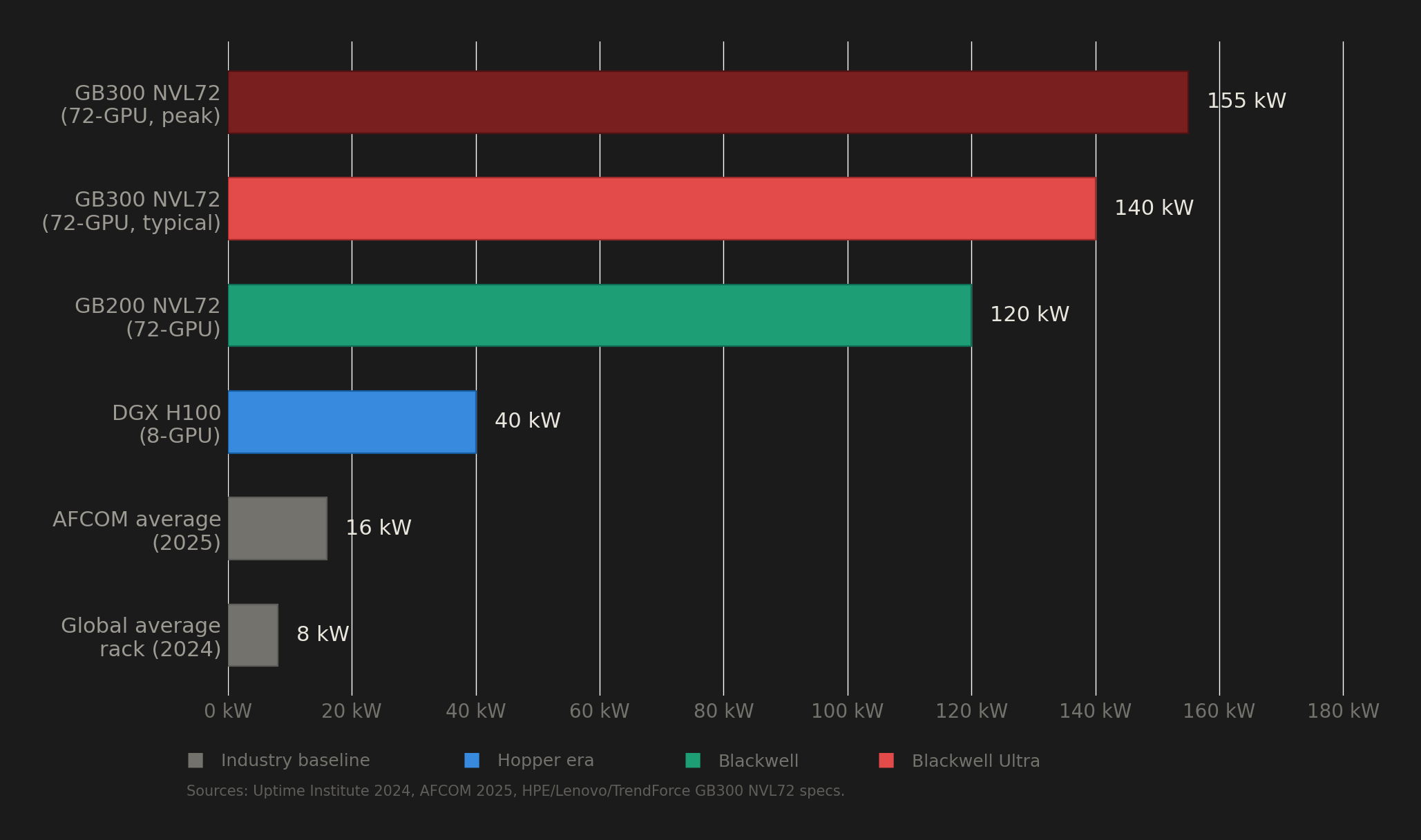
A single GB300 NVL72 rack, fully loaded with 72 of these GPUs, pulls 132 to 140 kW under normal operation. To put that number in perspective, the global average rack density in data centers sits at roughly 8 kW. So the B300 needs about 17 times the power of a typical rack. And according to Uptime Institute's 2024 survey, only about 1% of data center operators currently run racks above 100 kW.

Rack power density comparison

That gap between what the B300 demands and what the world's data center infrastructure can actually deliver is the story nobody is telling properly. Behind every cloud GPU instance running Blackwell Ultra is a facility that had to solve problems in power delivery, liquid cooling, and grid access that most buildings on earth are not equipped to handle.

This post breaks down the real infrastructure cost of running B300s, the deployment problems operators have already encountered, and why the electricity grid itself is becoming the binding constraint on AI compute scaling.

GPU Rowhammer Is Real: A Single Bit Flip Drops AI Model Accuracy from 80% to 0.1%

· 13 min read
Dhayabaran V
Barrack AI

A single bit flip in GPU memory dropped an AI model's accuracy from 80% to 0.1%.

That is not a theoretical risk. It is a documented, reproducible attack called GPUHammer, demonstrated on an NVIDIA RTX A6000 by University of Toronto researchers and presented at USENIX Security 2025. The attack requires only user-level CUDA privileges and works in multi-tenant cloud GPU environments where attacker and victim share the same physical GPU.

GPUHammer is not the only GPU hardware vulnerability. LeftoverLocals (CVE-2023-4969) proved that AMD, Apple, and Qualcomm GPUs leak memory between processes, allowing full reconstruction of LLM responses. NVBleed demonstrated cross-VM data leakage through NVIDIA's NVLink interconnect on Google Cloud Platform. And at RSA Conference 2026, analysts highlighted that traditional security tools monitor only CPU and OS activity, leaving GPU operations completely invisible.

If you are training or running inference on cloud GPUs, this matters. Here is the full technical breakdown.

NVIDIA Spent $20 Billion Because GPUs Alone Can't Win the Inference Era

· 19 min read
Dhayabaran V
Barrack AI

On March 16, 2026, Jensen Huang took the stage at GTC in San Jose and unveiled the NVIDIA Groq 3 LPU: a chip that is not a GPU, does not run CUDA natively, and exists for one reason only. Inference.

Three months earlier, on Christmas Eve 2025, NVIDIA paid $20 billion in cash to license Groq's entire patent portfolio, hire roughly 90% of its employees, and acquire all of its assets. It was the largest deal in NVIDIA's history. The company that built the GPU monopoly spent $20 billion on a chip that replaces GPUs for the most latency-sensitive phase of AI inference.

This is not a product announcement recap. Every major outlet has covered the Groq 3 specs. What nobody has published is the synthesis: why the GPU company needed a non-GPU chip, what the data says about GPU architectural limitations during inference decode, and what this means for the thousands of ML teams currently renting GPUs for inference workloads.

Every claim in this post is sourced. NVIDIA's own projections are labeled as such. Independent benchmarks are cited separately.