
8 posts tagged with "GPU Cloud"

GPU cloud infrastructure and compute instances

View All Tags

B300 Draws 1,400W Per GPU. Most Data Centers Aren't Ready.

· 11 min read
Dhayabaran V
Barrack AI

NVIDIA's B300 GPU draws up to 1,400W per chip. That is double the H100, which shipped barely two years ago.

A single GB300 NVL72 rack, fully loaded with 72 of these GPUs, pulls 132 to 140 kW under normal operation. To put that number in perspective, the global average rack density in data centers sits at roughly 8 kW. So the B300 needs about 17 times the power of a typical rack. And according to Uptime Institute's 2024 survey, only about 1% of data center operators currently run racks above 100 kW.
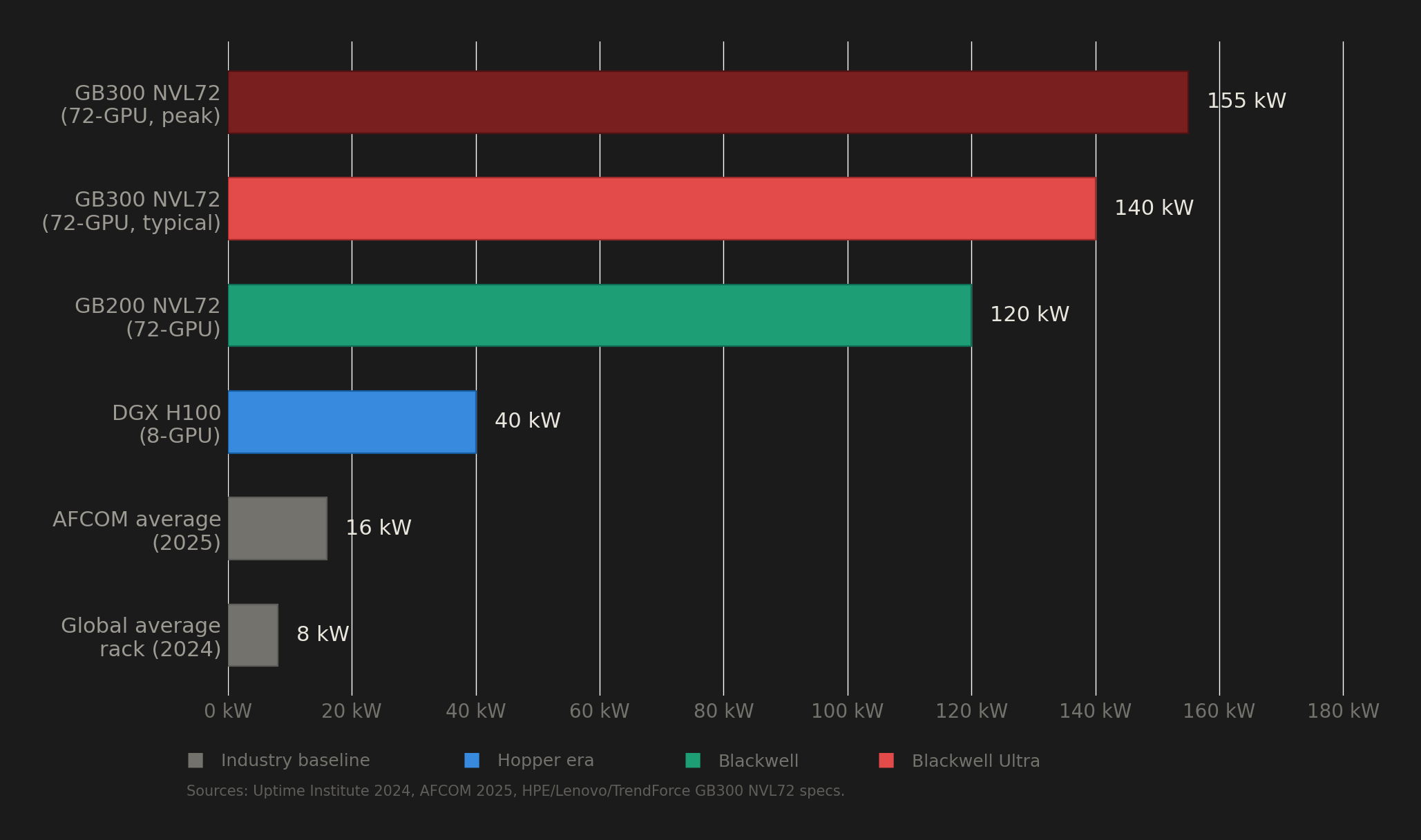
Rack power density comparison

That gap between what the B300 demands and what the world's data center infrastructure can actually deliver is the story nobody is telling properly. Behind every cloud GPU instance running Blackwell Ultra is a facility that had to solve problems in power delivery, liquid cooling, and grid access that most buildings on earth are not equipped to handle.

This post breaks down the real infrastructure cost of running B300s, the deployment problems operators have already encountered, and why the electricity grid itself is becoming the binding constraint on AI compute scaling.

Your ML Pipeline's Security Scanner Was Stealing Your Cloud Credentials for 12 Hours

· 15 min read
Dhayabaran V
Barrack AI

On March 19, 2026, threat actors hijacked Aqua Security's Trivy vulnerability scanner, one of the most widely used container security tools in the open-source ecosystem, and turned it into an infostealer that exfiltrated every secret it could find from CI/CD pipelines.

If your team runs trivy-action in GitHub Actions to scan Docker images before deploying to GPU cloud infrastructure, your GPU cloud API keys, HuggingFace tokens, Weights & Biases credentials, and cloud IAM keys may have been stolen.

The attack affected 75 of 76 release tags across a roughly 12-hour window. Over 10,000 GitHub workflow files reference trivy-action, and StepSecurity's Harden-Runner telemetry detected compromised instances making outbound connections to attacker infrastructure across 12,000+ public repositories.

This post breaks down exactly what happened, what was stolen, why ML engineers face outsized risk, and the precise steps you need to take right now.

NVIDIA Rubin at GTC 2026: Full Technical Breakdown for ML Engineers

· 18 min read
Dhayabaran V
Barrack AI

336 billion transistors. 288 GB of HBM4 per GPU. 22 TB/s memory bandwidth. 50 petaFLOPS of FP4 inference per chip.

Those are the numbers NVIDIA is putting behind Rubin, the successor to Blackwell, announced at CES 2026 and entering production for H2 2026 deployment. GTC 2026 kicks off March 16 in San Jose, where Jensen Huang is expected to go deep on Rubin's architecture, pricing signals, and the software stack updates that make these numbers real.

The 2026 GPU Memory Crisis: What the Data Actually Shows

· 20 min read
Dhayabaran V
Barrack AI

The global semiconductor industry is experiencing a structural memory shortage that has reshaped GPU availability, pricing, and procurement strategy across every computing sector. This is not a repeat of the pandemic or crypto-era supply disruptions. According to IDC, it represents "a potentially permanent, strategic reallocation of the world's silicon wafer capacity" toward high-margin AI memory products. The consequences extend from data center GPU lead times stretching beyond 30 weeks to consumer DRAM prices doubling quarter over quarter, with relief not expected before late 2027 at the earliest. For organizations that depend on GPU compute, the question is no longer when supply normalizes but how to secure access in a market where every wafer is spoken for.

NVIDIA Rubin vs. Blackwell: Rent B200/B300 Now or Wait?

· 14 min read
Dhayabaran V
Barrack AI

For most AI teams in 2026, the answer is clear: rent Blackwell now. NVIDIA's Rubin platform promises transformational gains, including 10x lower inference token costs and 5x per-GPU compute. But volume shipments won't begin until H2 2026, and meaningful cloud availability for non-hyperscaler customers likely extends into 2027. Meanwhile, Blackwell B200 GPUs are available today across 15+ cloud providers at $3–$5/hr on independent platforms, delivering 3x inference throughput over H200 and 15x over H100. Historical GPU pricing data shows that next-gen announcements don't crash current-gen prices. Supply expansion does. Pay-as-you-go cloud billing eliminates lock-in risk entirely. This report compiles every verified fact, benchmark, and pricing data point you need to make the decision.

Generate AI Videos on Your Own GPU — WAN 2.1 + ComfyUI, Pre-Configured

· 9 min read
Dhayabaran V
Barrack AI

AI video generation models like WAN 2.1 are open-source and free to run. The actual barrier is setup — downloading 14 billion parameter model weights, installing ComfyUI, configuring custom nodes, resolving dependency conflicts, and ensuring the correct workflow templates are in place. On a fresh VM, this takes hours.

We built two pre-configured VM images that skip the entire process. Every model, every custom node, and every workflow template is already installed. You deploy the VM, open your browser, load a template, and generate video.

This guide covers both images: one for text-to-video, and one that adds image-to-video on top of it.

Run FLUX, Stable Diffusion, and Train LoRAs — One-Click GPU Setup

· 8 min read
Dhayabaran V
Barrack AI

Setting up an image generation environment with FLUX, Stable Diffusion, and LoRA training involves installing ComfyUI, downloading multiple model checkpoints (each several gigabytes), configuring Kohya for training, and ensuring all dependencies resolve cleanly. Depending on your starting point, this takes one to several hours.

We built a VM image with everything pre-installed. FLUX and Stable Diffusion models are downloaded. ComfyUI is configured. Kohya training tools are ready. You deploy the VM, open port 9093 in your browser, and start generating or training.

Self-Host Qwen 3-32B in Minutes — Zero Configuration Required

· 7 min read
Dhayabaran V
Barrack AI

Running a 32-billion parameter language model on your own GPU typically involves installing drivers, setting up Ollama, downloading model weights, configuring a web interface, and troubleshooting port conflicts. That process takes anywhere from 30 minutes to several hours depending on your familiarity with the tooling.

We built a pre-configured VM image that eliminates all of it. You select a GPU, pick the image, and deploy. The model is already downloaded, Ollama is already running, and OpenWebUI is already serving on port 8080. You open your browser and start using it.

This guide walks through the exact steps.